
Angularでは、*ngIfを使って表示したい画面を制御できます。
例えば、ゴールド会員だった場合にボタンを表示するといった仕様を見てみましょう。
以下のようにisGoldMemberがfalseの場合はゴールド会員のボタンは非表示、isGoldMemberがtrueの場合はゴールド会員のボタンを表示するようにします。
import { Component, OnInit } from '@angular/core';

@Component({
  selector: 'app-t3',
  templateUrl: './t3.component.html',
  styleUrls: ['./t3.component.css']
})
export class T3Component implements OnInit {
  public isGoldMember: boolean = false;

  constructor() { }

  ngOnInit(): void {
    this.isGoldMember = true;
  }

}
*ngIf=”isGoldMember”とすることで、isGoldMemberがtrueの場合、ゴールド会員のボタンが表示されるようになります。
<div class="member">
    <div>会員情報を表示</div>
    <div class="button-field">
        <button>一般会員</button>
        <button *ngIf="isGoldMember">ゴールド会員</button>
    </div>
</div>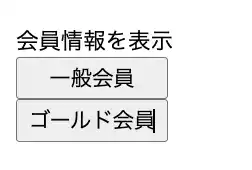
また、isGoldMemberの初期値はfalseなので、以下のようにisGoldMemberがtrueになる処理がなければ、ゴールド会員のボタンも表示しません。
import { Component, OnInit } from '@angular/core';

@Component({
  selector: 'app-t3',
  templateUrl: './t3.component.html',
  styleUrls: ['./t3.component.css']
})
export class T3Component implements OnInit {
  public isGoldMember: boolean = false;

  constructor() { }

  ngOnInit(): void {
  }

}

*ngIfは条件を複数指定できます。
例えば、ゴールド会員ボタンを表示させる場合に、ゴールド会員フラグとは別にポイントが100ポイント以上の条件も追加するとこんな感じです。
import { Component, OnInit } from '@angular/core';

@Component({
  selector: 'app-t3',
  templateUrl: './t3.component.html',
  styleUrls: ['./t3.component.css']
})
export class T3Component implements OnInit {
  public isGoldMember: boolean = false;
  public point: number;

  constructor() { }

  ngOnInit(): void {
    this.isGoldMember = true;
    this.point = 100;
  }

}
<div class="member">
    <div>会員情報を表示</div>
    <div class="button-field">
        <button>一般会員</button>
        <button *ngIf="isGoldMember && point >= 100">ゴールド会員</button>
    </div>
</div>
this.point = 100以上の時は、ゴールド会員ボタンが表示されるし、this.point = 0とかにすると、ゴールド会員ボタンが非表示にできます。
エンジニアの基礎力を上げるおすすめ本を紹介!
- 30冊以上紹介(個人的に推し本の『仮説思考』の何が良かったかも書いています)
- エンジニアなら読むべき定番の技術本や思考力を上げるなど…多数の本を紹介
- AIの回答を判断できるための知識をつける本がたくさん
あわせて読みたい
エンジニアなら読むべきおすすめ本【2026年版の基礎力が身につく必読書】
「AIに聞けば答えは出る。でも、その答えの『正しさ』を判断する力はありますか?」 なかなか「正しく判断する力は私はある」と答えられる人は少なくなってきているので...






コメント